Git 協作實戰:讓求職助理的每次變更可檢查、可回復
摘要
接到新增 Resume API 的工單時,工作目錄裡可能已有 README 修改與未追蹤的 .env。Git 不會替人判斷哪些修改屬於工單。本章從這個情境練習檢查、選擇與提交,再做一次可重現的 merge conflict。
完成後能解釋 working tree、index、HEAD 與 branch,寫出範圍清楚的 commit,並在 PR review、合併與回復時保留可理解的歷史。前置成果是 Python 套件與四個測試。
資料基準:2026-10-22。以下操作只在自己的 ai-job-application-assistant/ 練習 repo 執行。文章中的分支切換不是對知識庫目前分支的操作指示。
先知道比較的是哪兩份內容
| 狀態或指令 | 意義 |
|---|---|
| Working tree | 磁碟上正在編輯的檔案 |
| Index/staging area | 準備放入下一次 commit 的內容;git add 當下的版本 |
| Commit | 一份已保存的專案快照及其父提交、訊息等 metadata |
| Branch | 指向 commit 的可移動名稱 |
| HEAD | 通常指向目前分支;也可能直接指向某個 commit |
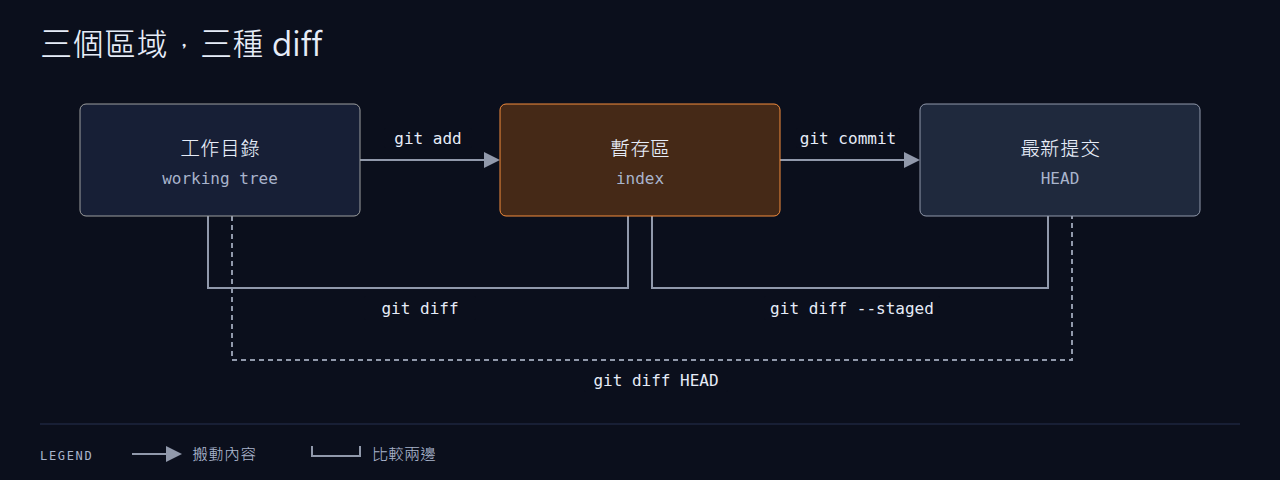
git diff |
Working tree 相對於 index 的差異,不含未追蹤檔內容 |
git diff --staged |
Index 相對於 HEAD 的差異 |
git diff HEAD |
已追蹤檔在 working tree 相對於 HEAD 的差異 |
因此 git add app/main.py 後又修改該檔,下一次 commit 只包含 add 當時的版本。git status 可能同時在 staged 與 unstaged 區列出它。同一個檔案可同時有這兩種差異。參考 git-diff 與 git-add。
把第一章成果保存成起點
尚未初始化 repo 才執行第一行;已經有 repo 就保留原歷史。若 commit 提示缺少身分,依自己的姓名與 email 設定 repository-local user.name、user.email。
git init -b main
git status --short
git add -- .gitignore app/__init__.py app/services/__init__.py app/services/matching.py app/cli.py tests/test_matching.py requirements.txt
git diff --staged --stat
git diff --staged
python -m pytest -q
git commit -m "feat: add tested resume matching core"
第一章的兩個示範文字檔可留在本機;這次未選取它們。git status 應只剩這些預期的未追蹤檔,不能把有未追蹤檔的狀態說成完全乾淨。
新增 README.md,先存一個小版本:
工單情境:README 修改未提交,還有 .env
先執行:
git status --short
git branch --show-current
git diff -- README.md
git diff --staged
git check-ignore -v .env
.env 被上一章的 ignore 規則排除時,check-ignore 會顯示命中的規則;若沒有輸出且 exit 1,檢查 .gitignore。不要為了查看狀態而把秘密印到終端或貼進 PR。
原對話的追問預設「有未提交修改就不能建立分支」,這不正確。從目前 HEAD 執行 git switch -c feature/resume-api 通常會保留未提交修改;如果切往另一個起點會覆蓋它們,Git 才會拒絕。修改尚未屬於某個 commit,並不會因為建立分支就消失。詳見 git-switch。
怎麼處理 README 取決於內容:
- 是 Resume API 的說明:可以帶到功能分支,和功能一起完成。
- 是獨立修字:先提交成單獨文件變更,再開始工單。
- 還沒想好的修改:保存到另一個工作分支或用
git stash push -- README.md暫存,之後用git stash apply取回並檢查;不要把.env一起 stash。
本次練習選第二種,確定 README diff 只含獨立修字後:
git add -- README.md
git diff --staged
git commit -m "docs: clarify matching test instructions"
git switch -c feature/resume-api
git status
若沒有 README 變更,略過該次 commit。第三章的 API、service 與測試都在這個 feature branch 完成。
.gitignore 只處理尚未追蹤的檔案。若 .env 已被追蹤,git rm --cached -- .env 只停止未來追蹤,工作檔仍在,歷史裡的秘密也仍在。已分享或外洩的 credential 要先撤銷、輪替,再依團隊流程清理歷史;重新提交一個刪檔不能撤回它。參考 gitignore 與 GitHub 的敏感資料處理指引。
提交工單與送 review
完成第三章之後才執行這段,避免提前 add 不存在的檔案:
git status --short
git diff
git add -- app/errors.py app/schemas.py app/repositories.py app/dependencies.py app/services/assistant.py app/routers/__init__.py app/routers/api.py app/main.py tests/test_api.py requirements.txt
git diff --staged --check
git diff --staged
python -m pytest -q
git commit -m "feat: add authenticated job assistant API"
新檔不會出現在普通 git diff,stage 後一定要再看 staged diff。我建議每個 commit 完成一件可驗證的事;README 修字與 Docker 實驗留給各自提交,之後撤回 API 時才不會連帶撤回無關內容。
Git 在本機記錄歷史;GitHub 才提供 Issue、PR、review 與保護規則。先在 GitHub 建立自己的空 repo,再以頁面提供的實際 URL 加入 remote;下面的 OWNER 要替換成自己的帳號。這是讀者的練習步驟:
git remote add origin git@github.com:OWNER/ai-job-application-assistant.git
git push -u origin main
git push -u origin feature/resume-api
在 GitHub 開 PR,base 選 main,compare 選功能分支。描述可寫:
Add the job assistant API with an operator bearer key.

Creates users, resumes, jobs and saved matching results.
Rejects invalid payloads and returns 409 for duplicate records.

Validation: python -m pytest -q
Closes #101
#101 只在真的有該 Issue 時填。Reviewer 應檢查邊界輸入、秘密是否入版、API 契約與測試,而不只看命名。修改 feedback 後在同一分支加 commit、重新跑測試、再 push,PR 會更新。
親手做一次衝突
以下用獨立的暫存 repo 練習,避免把測試衝突留在專案分支。先前已設定 Git 身分才可 commit;必要時在新 repo 設定 local 身分。
practice_dir=$(mktemp -d)
git init -b main "$practice_dir"
cd "$practice_dir"
printf '%s\n' 'Storage: memory' > architecture.txt
git add -- architecture.txt
git commit -m "docs: describe initial storage"
git switch -c feature/postgres-docs
printf '%s\n' 'Storage: PostgreSQL with migrations' > architecture.txt
git commit -am "docs: describe persistent storage"
git switch main
printf '%s\n' 'Storage: memory for local exercises' > architecture.txt
git commit -am "docs: clarify local storage"
git merge feature/postgres-docs
最後一行應報 conflict,檔案出現 <<<<<<<、=======、>>>>>>>。兩條分支改了共同祖先的同一行,Git 無法判斷要留下哪個意思。
不要直接選「全部 ours」或「全部 theirs」。閱讀兩邊意圖,把檔案改成:
git add -- architecture.txt
git diff --staged --check
git diff --staged
git commit -m "docs: distinguish exercise and persistent storage"
git log --oneline --graph --all -6
預期沒有 conflict marker,且圖上有 merge commit 接回兩條分支。若判斷還不清楚,可在未完成 merge 時用 git merge --abort 回到合併前。練習後 cd 回自己的專案根目錄;不必刪除暫存 repo。
Merge、rebase 與回復各改變什麼
Merge 保留兩邊歷史;rebase 把分支的提交重新套到另一個起點,產生新的 commit ID。個人未分享分支可以在 git fetch origin 後,以 git rebase origin/main 整理;有衝突時修檔、git add、git rebase --continue,或 git rebase --abort。已供別人接續的分支避免任意改寫,是否重排由團隊決定。小團隊可先採短生命週期 feature branch 加 PR,無須一開始引入多層 release 分支。
| 想做的事 | 指令與預期 |
|---|---|
| 取消暫存、保留檔案修改 | git restore --staged -- README.md;index 回到 HEAD |
| 撤回已分享的一般提交 | git revert <commit>;建立反向提交,保留原歷史 |
| 把最後一個尚未分享的提交拆開 | git reset --soft HEAD~1;分支往前一個父節點移動,內容留在 index |
| 取消最後一個本機提交的暫存狀態 | git reset --mixed HEAD~1;內容留在 working tree |
| 找回誤移動前的本機位置 | git reflog -8;先讀記錄,再決定如何救回 |
上述 reset 例子要求有父提交且先確認目前分支和 diff;不應拿來撤回同事已經使用的 commit。reset --hard 會覆蓋已追蹤的本機修改,本系列不需要它。Merge commit 的 revert 還需選主線父節點,不宜套用一般提交的指令。參考 git-reset、git-revert 與 git-rebase。
常見錯誤與自我檢核
- [ ] 終端情境題:README staged 後又改了一行。預期能分別用兩種 diff 說出「下一次 commit 會收哪個版本」。
- [ ] Bug 題:
.env加入 ignore 後仍出現在git ls-files -- .env。預期指出它已被追蹤,停止追蹤與撤銷秘密是兩件工作。 - [ ] 衝突題:完成暫存 repo 實驗。預期語意保留兩種用途、無 marker、history 有兩個父節點。
- [ ] 回復題:在暫存 repo 建立一個普通測試 commit 再 revert。預期多出反向 commit,原 commit 仍在。
- [ ] 協作題:完成第三章後送 PR。預期只含 API 功能、相關依賴與測試;不含
.env、.venv或真實履歷。
下一步:FastAPI API 實作。
參考與來源
- 原始家教對話:Git 協作實戰(chat5,整理於 2026-10-22);補上分支情境答案、衝突實驗、review 與回復。
- Git 官方手冊
- Pro Git:Basic Branching and Merging
- GitHub:About pull requests